
Image tools
Convert formats
Convert to PNG
File tools
Compress
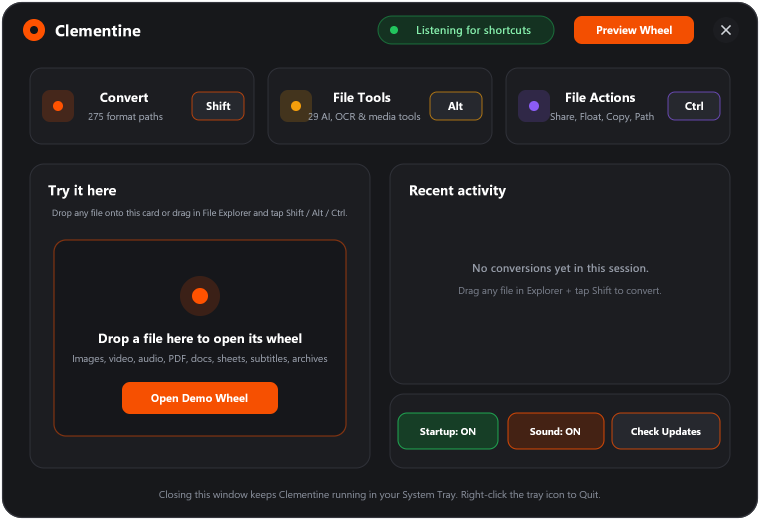
Start dragging, then tap a key. The wheel stays open until you drop. Change the keys in Settings.
Drag a file, tap Shift, and drop. Turn files into the formats you need without breaking your flow.
Everything happens locally on your PC.
Across images, video, audio, documents, spreadsheets, and archives.
Neural AI Remove BG, Offline OCR, 2x/4x Upscale, trim, split, merge, and more.
Nearby Share, Float, Copy, Move, Copy Path, and Terminal.
Start dragging, then tap a key. The wheel stays open until you drop. Change the keys in Settings.
Drag any file or folder, then tap Control.
Works with folders, mixed selections, and files of any type. 100% free and unlimited with zero cloud uploads.
Engineered for Windows 10 & 11
Clementine is written in pure Rust and Win32 GDI/Direct2D. It lives silently in your Windows System Tray, hooks File Explorer and VS Code drags in real time, and updates itself directly from GitHub Releases.
JPG PNG WebP HEIC TIFF AVIF BMP
PDF export · SVG input onlyMP3 M4A WAV FLAC OGG Opus AIFF WMA
MP4 MOV MKV WebM AVI WMV GIF
MP3 exportPDF → DOCX PAGES PPTX XLSX JPG PNG EPUB TXT MD
All pages · images at 300 DPIDOCX PAGES Markdown TXT EPUB
RTF, RTFD & text clippings input · HTML exportPPT / PPTX → PDF JPG PNG
PPT input only · PDF to PPTXXLSX ODS CSV TSV
PDF export · XLS input onlySRT VTT
TXT exportZIP TAR GZIP
RAR input onlyPrivacy
Online converters need you to upload a copy of your file. That puts private documents, photos, and metadata on a server you do not control.
Your file leaves your PC, so you have to trust how another service stores, processes, and deletes it.
Conversions and file tools run on your PC. Your files are never uploaded to us.
Get Clementine
Download Clementine for Windows from GitHub Releases, or install it with Winget.
Clementine-Setup.exe (3.3 MB · Auto-starts on boot)
Windows 10 & 11 (x64 & ARM64) · Native Rust + Direct2D · ~7.5 MB RAM · 100% Local & Open Source (MIT)
Drag a file, then tap Shift for conversions, Alt for file tools, or Control for actions. Release the key and keep dragging; the wheel stays open until you drop or cancel. Or press Enter on a file to open the format menu, then use Alt or Control to switch wheels. Use arrow keys to choose, Enter to apply, and Escape to cancel. On a touch screen, drag to move or hold a file briefly before dragging to convert. All operations on this page are simulated.