Enchantment Limiter
Cap the maximum level of any enchantment on your server to prevent overpowered gear from dominating PvP.
Why Limit Enchantments?
Vanilla Minecraft enchantments at maximum level create power imbalances:
- Sharpness V adds 3 damage (1.5 hearts) per hit, making fights end too quickly
- Protection IV on all armor pieces reduces damage by 64%, making players too tanky
- Power V bows can two-shot unarmored players from across the map
- Efficiency V tools trivialize resource gathering
Capping enchantment levels makes skill matter more than gear.
How It Works
The Enchantment Limiter intercepts enchantments at multiple points:
- Enchanting Table - When a player enchants an item, levels above the cap are reduced automatically
- Anvil Combining - When combining enchanted items, the result respects the cap
- Item Pickup - Items picked up from the ground are capped automatically
- Villager Trades - Enchanted books from villagers are capped
Configuration
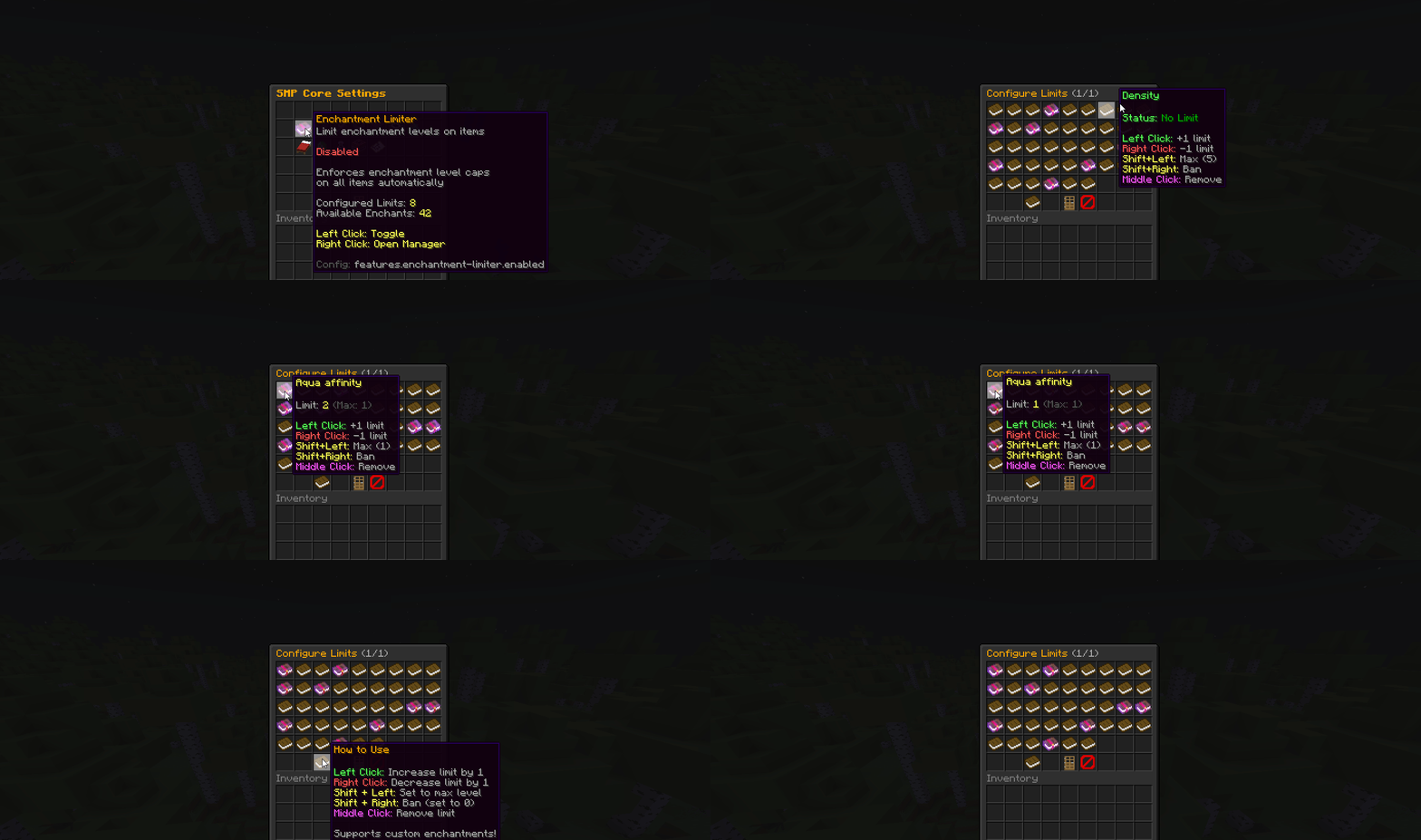
The Enchantment Limiter is primarily managed through an in-game GUI. The config stores your limits:
features:
  enchantment-limiter:
    enabled: false
    limits:
      sharpness: 4
      protection: 3
      fire_protection: 3
      feather_falling: 3
      blast_protection: 3
      projectile_protection: 3
      thorns: 2
      depth_strider: 2
      frost_walker: 2
      swift_sneak: 2
      soul_speed: 2
      power: 4
      punch: 1
      flame: 1
      piercing: 3
      quick_charge: 2
      multishot: 1
      loyalty: 2
      impaling: 4
      riptide: 2
      channeling: 1
      efficiency: 4
      fortune: 2
      looting: 2
      luck_of_the_sea: 2
      lure: 2
      knockback: 1
      fire_aspect: 1
      sweeping_edge: 2
      smite: 4
      bane_of_arthropods: 4
      density: 4
      breach: 3
      wind_burst: 2
Configuration Options
| Option | Type | Default | Description |
|---|---|---|---|
enabled | boolean | false | Whether the feature is active |
limits | map | empty | Enchantment name (lowercase) to maximum level mapping |
Use lowercase enchantment names with underscores (e.g., fire_protection, swift_sneak).
Using the GUI
Opening the Enchantment Limiter Menu
- Run
/smpto open the main menu - Click on the Enchanted Book icon labeled "Enchantment Limiter"
Understanding the Display
The menu shows all Minecraft enchantments organized by category. Each enchantment displays:
- The enchantment name
- Your configured cap (if set)
- Current status (Limited / Unlimited)
Setting an Enchantment Cap
- Click on the enchantment you want to limit
- A prompt appears in chat asking for the maximum level
- Type a number between 0 and the vanilla maximum
- Press Enter
Setting a cap of 0 effectively disables that enchantment entirely.
Removing a Cap
- Click on a capped enchantment
- Type
removeor-1in chat - The cap is removed and the enchantment returns to vanilla behavior
Enchantment Reference
Combat Enchantments
| Enchantment | Vanilla Max | Recommended Cap | Effect per Level |
|---|---|---|---|
sharpness | 5 | 3-4 | +1.25 damage |
smite | 5 | 3-4 | +2.5 damage vs undead |
bane_of_arthropods | 5 | 3-4 | +2.5 damage vs arthropods |
power | 5 | 3-4 | +25% arrow damage |
punch | 2 | 1 | +3 blocks knockback |
knockback | 2 | 1 | +3 blocks knockback |
fire_aspect | 2 | 1 | +4 seconds fire |
Protection Enchantments
| Enchantment | Vanilla Max | Recommended Cap | Effect per Level |
|---|---|---|---|
protection | 4 | 3 | +4% damage reduction |
fire_protection | 4 | 3 | +8% fire damage reduction |
blast_protection | 4 | 3 | +8% explosion damage reduction |
projectile_protection | 4 | 3 | +8% projectile damage reduction |
feather_falling | 4 | 3-4 | +12% fall damage reduction |
thorns | 3 | 2 | Chance to reflect damage |
Mace Enchantments (1.21+)
| Enchantment | Vanilla Max | Recommended Cap | Notes |
|---|---|---|---|
density | 5 | 3-4 | Increases smash attack damage |
breach | 4 | 2-3 | Bypasses armor |
wind_burst | 3 | 1-2 | Launches targets upward |
Tool Enchantments
| Enchantment | Vanilla Max | Recommended Cap | Notes |
|---|---|---|---|
efficiency | 5 | 4 | Eff 5 trivializes mining |
fortune | 3 | 2-3 | Usually left uncapped |
looting | 3 | 2-3 | Usually left uncapped |
Presets
Balanced PvP
limits:
  sharpness: 3
  protection: 3
  power: 3
  punch: 1
  knockback: 1
  fire_aspect: 1
  thorns: 0
  density: 3
  breach: 2
This preset creates fights that last longer and reward skill over gear.
Hardcore Survival
limits:
  protection: 2
  sharpness: 2
  efficiency: 3
  fortune: 2
This preset makes survival more challenging.
Vanilla-Like (Minimal Changes)
limits:
  thorns: 2
  punch: 1
  knockback: 1
This preset only nerfs the most annoying enchantments while keeping most gameplay vanilla.